Before You Build an App With AI, Build a Workspace
Artificial Intelligence
Business Software
Custom Software

Author
Caleb Woods

Most businesses try AI by chatting with it, then want to build the app they’ve always imagined. There’s a better step in between. An AI workspace gives your AI your context, skills, and connections to your systems. It shows you which workflows deserve real software, and when the shared pieces belong in a hub.
Most businesses are still figuring out what adopting AI looks like for them. A lot of people start by chatting with it, getting help writing better emails or thinking through a problem. Then the next instinct is to build something: the software tool they've always imagined, now that AI makes building feel within reach.
I think there's a better step in between. Bring your AI to your systems, and give it a place to work from that's connected to the tools you already use. At RoleModel, we call that a workspace.
In my last post I wrote about rethinking build vs. buy, and this is the path most people skip.
What is an AI workspace?
An AI workspace is a structured place that holds three things: your context, the skills that make repeated work run the same way every time, and connections to the systems you already use. It can start local, because at the end of the day it's just a folder on your machine. You work in it with AI coding tools like Claude Code or Codex. The name is misleading, since these tools are moving more and more toward general business use.
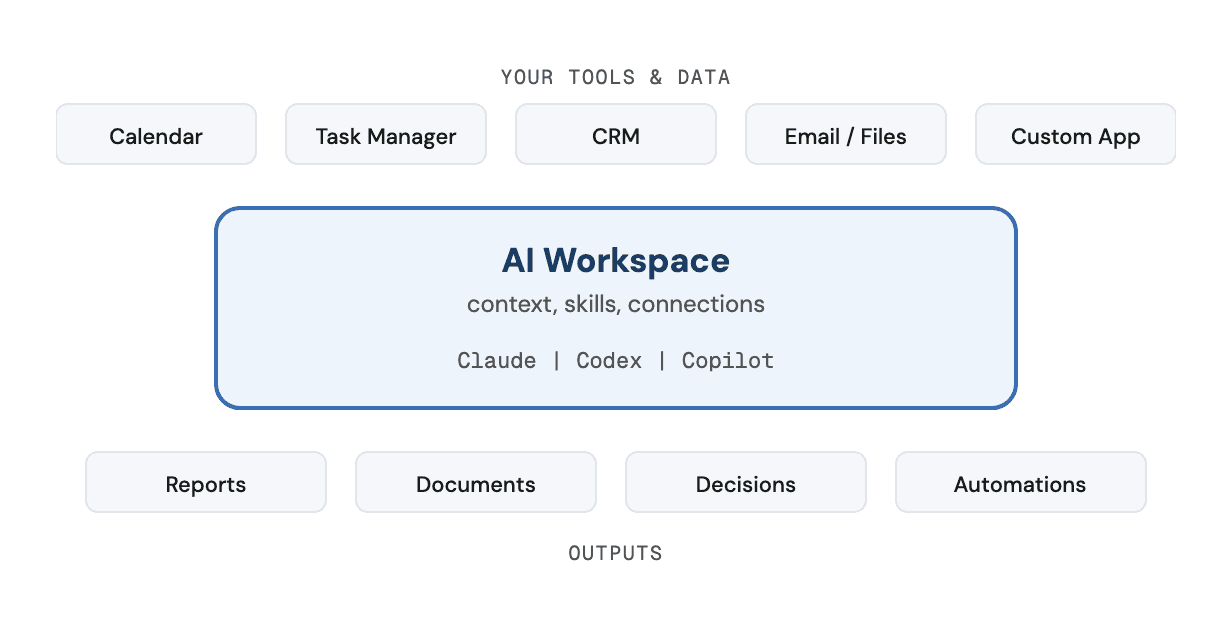
The difference from the chat you've been using is what sticks around. A chatbot is a doorway you walk through and leave. A workspace is a room set up for your work that stays set up, one you come back to whenever you need it. Every new conversation you start there already knows who you are, what you're working on, and which systems to pull from.
Some people call this an agentic OS, and it's close to the same idea. I think workspace is the better word, because it describes what it is for: the place where the work happens.
At RoleModel, ours is RoleModel Standard. It pulls live data from our own systems, including the internal applications we've built. It keeps our KPI dashboards for finances, project health, and delivery current without anyone assembling them by hand, and it helps us produce documents and other work with our brand standards built in.
What belongs in a workspace instead of an app?
A lot of the tools you'd be tempted to build.
Reporting is the classic example. It's really valuable, but it isn't how the work gets done, and it's hard to solve in an application because the needs are so varied. The data may come from several systems and need extra processing, and the questions you ask will change over time. A lot of reporting needs some reasoning and the next level of drill-down into what the data means. That's what a workspace can do. It can pull in the raw data and then follow up on the questions it raises, so you get the insights behind the data, not just the raw numbers.
Then there's the glue between systems you already own. Integrations are some of the riskiest parts of a software project, because that's where your data changes hands. With MCP, the open standard that lets AI connect to your systems, you can connect first, see what shape the data really has, and write your own rules based on what you learn. When the data isn't simple enough to work with directly, skills and scripts handle the processing.
And there's the chatbot someone wants for answering questions about the business. What they usually want is AI that already knows the business, which is what context gives you. When your notes, past work, and decisions live in the same place, they load when you need them. A meeting agenda pulls in what was said last time. A document or a slide deck starts from the context you already have.
How does a workspace show you what to build?
Custom software has always been a way to fit your tools to your competitive advantage: the way you work and how you want things to fit together. It's process first, software second. RoleModel has always set out to craft sustainable software solutions tailored to our partners' businesses.
A workspace can be even more personal than that. It can be shaped around each person's role and the things they need to know or care about, while the whole team still shares the same company context. It also gives one-off workflows a place to live.
I think of it like building a college campus. You can try to design every sidewalk up front, or you can let students walk for a while and then pave the paths they actually wear in. Working software has always been the best feedback loop for what you want to build, and a workspace lets you build very lightweight working software, like a simple page or report, without working out every detail first. When a workflow proves itself over weeks of real work, you know exactly what the software should be, and it is usually smaller than the version you would have built on day one.
One of our partners already had reporting we had built for them. When I sat with the owner and showed them their own quoting system connected to a workspace, it opened up far more ideas than that reporting ever had. You don't know what to ask for until you see your own data answering questions.
When does a workspace need to become a deployed hub?
Some of those paths do need paving, and here's how I draw the line. The work itself stays in a workspace, especially when one person is shaping it or it needs a tight feedback loop, like a slide deck or a document. That work can run across many conversations, and all of them draw on the same context, skills, and connections.
When other people need something from that work, that piece moves to a deployed hub. Sometimes it's the finished work itself, and sometimes it's the skills, knowledge, or data that needs to be shared or kept in sync across the whole team.
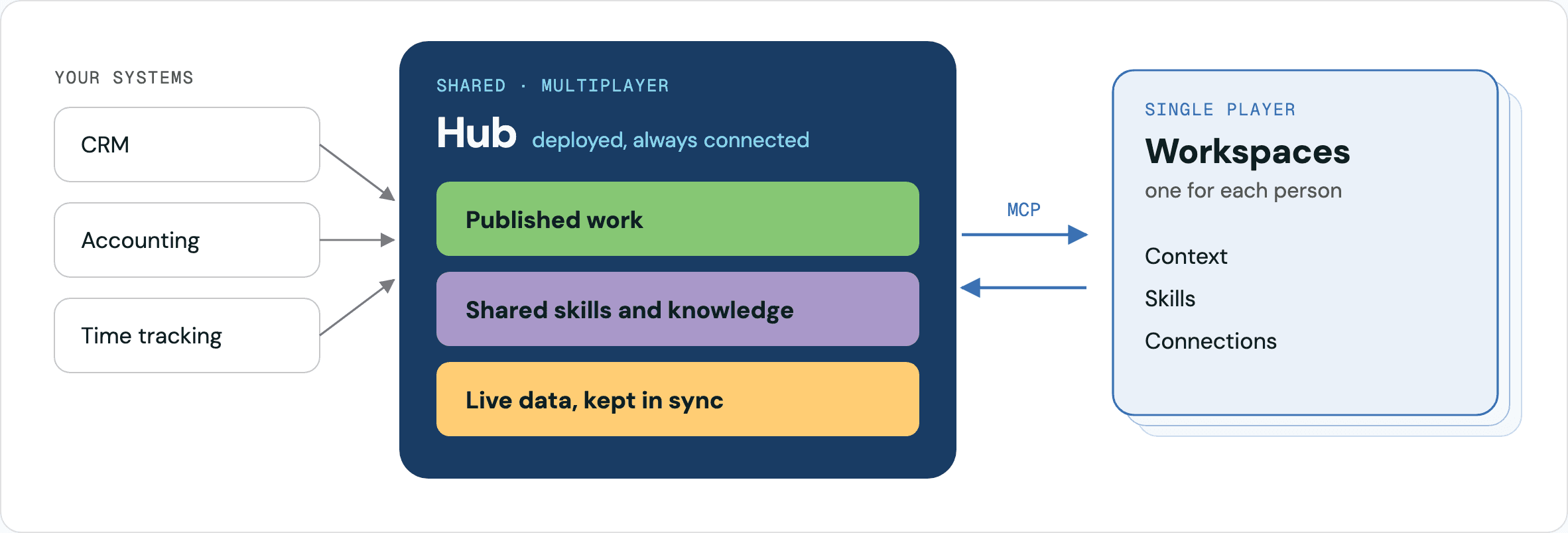
Publishing is where most people hit that line first. Once you've produced something useful in a workspace (a deck, a report, a dashboard), you want other people to see it and build on it. Claude's artifacts and ChatGPT Sites are two ways to do that. We built our own hosting framework, RolePress, which gives us more flexibility in what those pages can be, and we can layer it into the custom applications we build for our partners so they get the same capability without being locked into one AI provider.
The same thing happens with skills and knowledge. Every team needs to share workflows and agents tuned to how they work, and a hosted place means you update them once rather than in each person's setup. Some knowledge needs a map, too. Our internal system, Almanac, has a knowledge base of curated facts that point to where the data actually lives, so the AI can search and scan them quickly and then go get the real data.
Moving something into a hub also changes how it runs. A hub is always connected, so new data can flow in on its own and stay current. It costs differently, too. In a workspace, the AI runs on the subscription you already pay for and can lean on simple tools on your machine instead of spending compute on every step. In a hub, you pay for every token it uses.
The workspace stays. The shared pieces move up the stack into a hub that every workspace connects to.
Where to start
If you've been thinking about building the tool you've always imagined, start with a workspace and see which paths form. A personal workspace is something you can set up this week. Our free AI Workspace guide walks through it. Start small, with who you are, your task list, and your calendar, and let the rest build up as it becomes useful.
The team version is where the value compounds, and where the questions get hard enough to be worth working through with a partner who has built it before. If you're weighing whether something belongs in a workspace, a hub, or a new application, schedule a free workflow assessment and we'll talk through it with you.