CRAFT: Applying Craftsmanship to AI Prompting
Artificial Intelligence
Craftsmanship

Author
Caleb Woods
Most people treat AI like a search engine: one-line prompt in, generic output out. The problem isn't the tool. It's the input. CRAFT is a five-part framework for communicating with AI the same way you'd brief a sharp colleague: Context, Role, Ask, Fit, Tune. Each component gives the model something specific to work with so it stops guessing and starts producing output you can actually use.
Most people treat AI like a search engine. Put in a question, get out a response, move on. The output is too long, too generic, aimed at nobody in particular. So they conclude the tool doesn't yet work for their workflow.
The tool isn't the problem. The input is.
A vague prompt produces a vague response. A clear, structured prompt produces something you can actually use. But "write better prompts" isn't actionable advice. Teams need a framework, the same way they need patterns for running good meetings or writing effective briefs. Something repeatable. Something that connects to the discipline they already practice.
We've captured our mental model for prompting in the framework CRAFT. It's based on our experience using AI across projects and workflows throughout the business at RoleModel Software. The name is intentional. Craftsmanship means being disciplined about the work, not just getting it done but getting it right. That applies whether you're writing code, drafting a proposal, or communicating with an AI model.
The Framework
CRAFT has five components. Each one represents something you bring to the conversation to get better results.
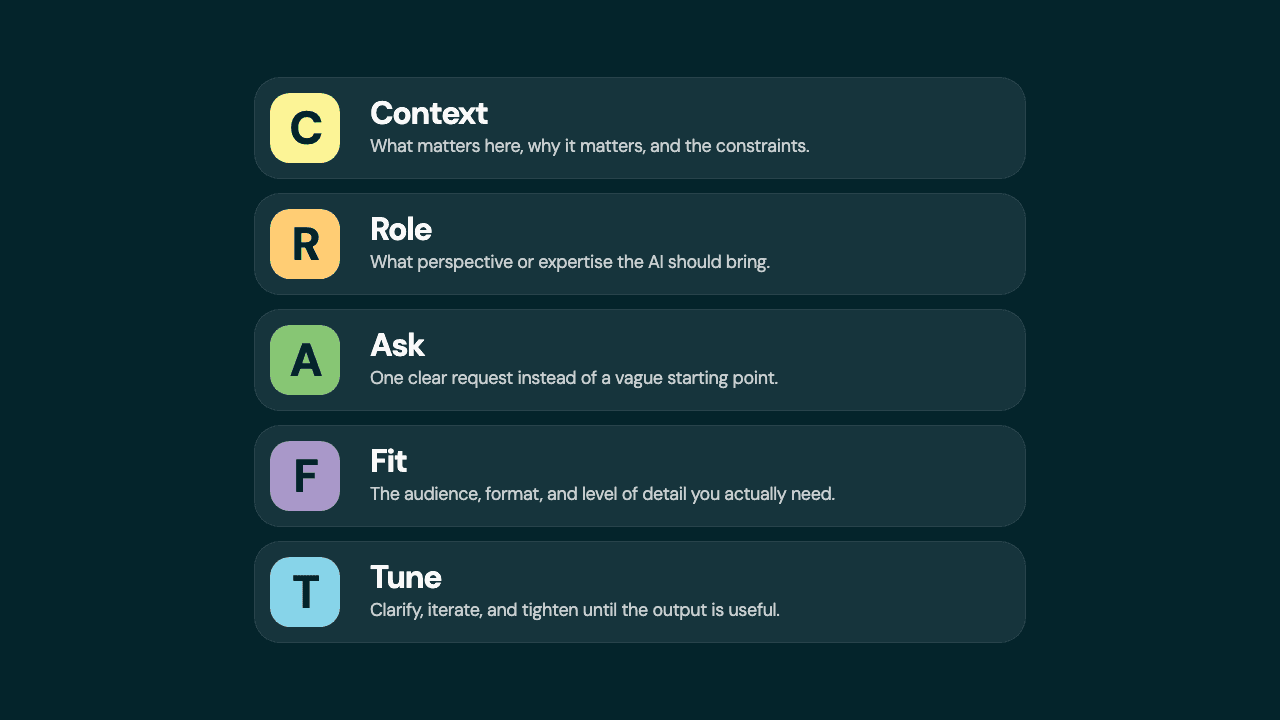
Context. Share the situation, background, and constraints. This is the single biggest lever for getting useful output. Without it, the model guesses. And guesses wrong.
Context includes what you're working on and why, what you've already tried or decided, and constraints the AI wouldn't know: timeline, audience, tools, preferences from the people involved. The more the model knows about your actual situation, the less it has to invent.
Here's the difference context makes:
Without context: "Write a welcome email."
With context: "We just signed a new consulting partner in financial services. They're used to working with large firms. Write a welcome email that sets the tone for a hands-on, collaborative partnership."
The second version gives the model a real situation to work with. The output reflects it.
Role. Tell the AI what expertise or perspective to bring. This shapes the lens it uses for everything that follows.
"You are a senior Rails developer reviewing this code for performance issues." "You are a consultant helping a non-technical stakeholder understand their options." "You are a security engineer looking for vulnerabilities."
Role is optional for simple tasks. For anything that requires a specific angle, it's the difference between asking anyone for advice and asking the right person. Role also works after the fact. Ask the model to review its own output from a different perspective, or multiple. It's a great way to pressure test your thinking before you ship it.
Ask. Make one clear, specific request.
Vague: "Help me with this API." Specific: "Review this API endpoint for error handling gaps and suggest fixes."
If you have multiple questions, ask them one at a time. A focused ask gets a focused answer. If you're not sure what to ask yet, start with the problem and let the conversation narrow the ask.
Fit. Shape the output to match your actual need. Tell the model what the output is for, what format you want, and how much detail matters.
"Explain this in terms a non-technical project manager would understand." "Give me a bulleted summary, not a full write-up." "Write this as a Slack message, not a formal email."
Without Fit, you get the model's default. Fit is where you turn generic AI output into something that belongs in your workflow.
Tune. Iterate, refine, redirect. This is where the real value lives.
Tune works in two directions. Before the AI produces anything, you can front-load the refinement: "Before you write this, ask me clarifying questions about my goals and priorities." The questions the model asks often reveal gaps in your own thinking. After you get output, push back: "This is too formal." "You missed the constraint about the legacy system." "Try again but focus on the security implications."
Most people accept the first response. The best results come from two or three rounds of tuning. Each round gets closer because you're teaching the model what you actually need.
CRAFT in Practice
Here's what a CRAFTed prompt looks like:
(Context) We're three weeks into a Rails upgrade for a financial services partner. We hit a dependency conflict last week that cost two days but it's resolved now. (Role) You're a project lead communicating to a non-technical stakeholder. (Ask) Write a weekly status update. (Fit) Keep it to 4-5 sentences, professional but not stiff. Acknowledge the delay without over-explaining the technical details. (Tune) Before you write this, ask me clarifying questions about my goals and priorities.
Compare that to "Write a project status update." The difference isn't cleverness. It's clarity. You're telling the model what you'd tell a colleague sitting next to you.
You don't need all five letters every time. For a quick question, Context and Ask might be enough. For a complex task, the full framework pays off for the additional upfront investment.
Why This Works
CRAFT isn't about making prompts longer. It's about making your thinking more precise before you hand it off.
The pattern mirrors what good problem solvers already do when they break down a problem and brief a teammate. You provide context so the person (or model) doesn't have to guess. You name the perspective that matters. You make the request specific. You define what "done" looks like. And you stay in the loop to course-correct.
The teams that get the most from AI tools are the ones that treat communication with the model the same way they treat communication with each other.
Beyond the Conversation
CRAFT works in a single conversation. But the real leverage comes when you stop repeating yourself. Most AI tools now support persistent instructions, memory, and reusable workflows (skills) that carry your context and preferences across every session. The Fit and Context you define once can apply automatically to everything that follows.
That's a topic for a future post. For now, start with CRAFT in a single conversation and see what changes.
Getting Started
Pick one task you'd normally hand to AI with a one-line prompt. Before you send it, run through CRAFT. Add the context the model doesn't have. Set a role if the perspective matters. Make the ask specific. Tell it who the output is for. Ask it to clarify before it starts.
Then compare the two results. That's usually all the convincing it takes.